Getting a critique of your manuscript
There’s a point in a draft where you can’t see it any more. You know every chapter too well to tell whether the middle sags, whether the ending pays off what the opening promised, or whether a reader who picked it up for the genre on the spine gets what they came for.
Even if you’re planning on hiring an editor, you’ll want them to get the best version of your manuscript, and edit yourself as much as you can.
Wisp is the room for that. It reads the whole book and reports to you: it analyzes Theme, Pacing, and Genre expectations. None of the three grades the book. They describe what it is doing, in its own terms, so you can decide whether that’s what you meant.
Before you start
You need a project with chapters in it, and that’s all — there’s nothing to configure and nothing to select. Each report reads the draft you’re currently in, from your first chapter to your last.
If Wisp isn’t on your project home, it’s just switched off: open the Apps menu at the top of the launcher and tick it back on.
Run a report
Open Wisp and pick Theme, Pacing or Genre expectations from the menu down the left.
Before the first run, the page tells you what that report contains, with the button under it — Analyze theme, Analyze pacing, Analyze genre expectations — and under that, how many runs you have this week.
Click it, and the first thing it says is Reading the book. That step builds a chapter-by-chapter reading of the whole manuscript, which all three reports are built on. It’s the slow part, but it’s only slow once:.
You don’t have to sit and watch. Leave the page, go write in Apparition, close the window if you like — the run is happening on your account, not in the tab, and the panel in the corner tells you when it lands.
What you get to keep
When the report arrives you can see it on the page, with the date and how many chapters it saw at the top of it. Three buttons sit over it:
- Save as note — keeps the report in the project as a note, beside the book.
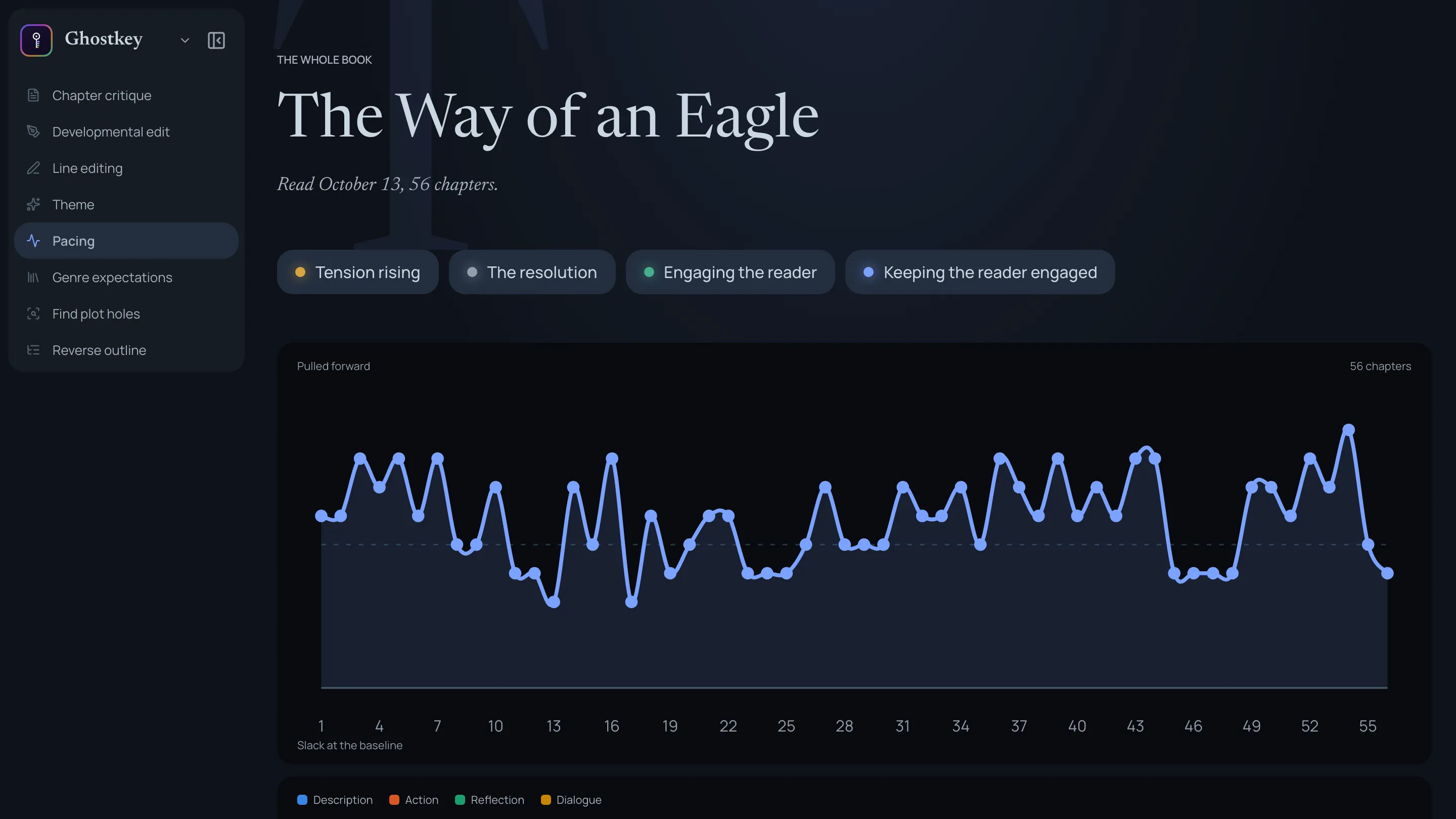
- Export PDF — the report as a document to print or send. The pacing’s wave is drawn into it.
- Run again — reads the book fresh and replaces the report. It spends another run from your week, so keep it for when something has actually changed.
The report stays until you replace it. Coming back to the page tomorrow, or opening the same book on another machine, shows you the same report and costs nothing. It is a snapshot, though: it describes the book as it stood on the date at the top, not as it is after tonight’s revision.
If a run fails or you cancel it, nothing is charged.
The three reports
Theme
Contains each theme your book develops, usually three to seven: not topics that happen to appear, but the things the story keeps returning to through choices, conflicts and images. Each one comes with what the book says about it — including characters, relationships, motifs — and how it develops, with a list of chapters. An overview explains how the themes work together.
Pacing
Contains the book’s rhythm as a wave, and every chapter’s place on it: a tension rating from 0 to 10 with a line saying why it sits there. Under the wave, the stretches: the runs of chapters that read as one movement (a slow build, a sustained high, a plunge into a lull), each described by what it does to a reader — where tension is released, where it’s withheld, whether a quiet stretch lets the book breathe or stalls it.
Genre expectations
Contains the genres a bookseller would shelve it under and why. Then, for each genre, the expectations that matter most, tagged Met, Subverted or Not addressed with an explanation as to why.
Which report to run
The three reports are on Basic and up. Each is paid in credits for what it reads — a theme report reads more of the book than the other two, so it costs more — and before it starts the page tells you about how many credits it will use and what share of your week that is. If a run fails, nothing is charged.
On the free plan, Wisp’s one reading is the opening critique: the same editor as the developmental edit, on your first chapter and any prologue before it. You get it once.
Each report takes a share of the week, so pick by the question you actually have:
- “It drags and I don’t know where.” Beta readers not finishing the story, a draft that feels long, a climax that doesn’t feel like one → Pacing.
- “Does this give a reader of my genre what they came for?” Before you write a blurb, pick comps, query, or start a series → Genre expectations. It’s also the one to run when a beta reader said something like “This is cliché” and you want to know if they’re right.
- “It works, but I couldn’t tell you what it’s about.” Choosing which subplot to cut, writing the line that sells it, working out whether the ending pays off → Theme.
And a few things that make the choice for you:
- Just finished a structural pass? Re-run the report you ran before it and compare. Only remember that Run again replaces the old report — Save as note first, and you have both to put side by side.
- Nothing here is a grade. A subverted expectation is a choice. A long lull is a choice. The reports say what the book does and where; what it should do is yours.
Around the three
The rest of Wisp’s menu is the same book at different distances:
- Reverse outline — speed read your book to identify issues quickly.
- Line editing — polish the prose. The same pass runs from Apparition’s chapter panel; Line edits and your style sheet covers its options.
- Continuity — a walk through the whole book for contradictions: the eyes that were blue in chapter three, the Tuesday that follows a Thursday. Available from Basic up.